What Slows Windows Down?
The first of two studies carried out in September 2006 showing what types of software and more interestingly which versions of those types make Windows XP slow down.
Any computer user that’s owned and installed software onto their computer knows that the more you install, the slower the beast runs. Most also know that it’s not just quantity and that what you install plays a large factor in how slowly your computer runs.
The aim of this article is to find out what types of application slow down a computer the most. I’m going to be measuring the“speed” as the time it takes to shutdown, restart and get back to desktop (with auto-login) and start an application in the computer’s start-up settings.
The Process
To make sure the tests are fair, I installed XPSP2a Professional (release1) onto a Microsoft VirtualPC 4 (sp1) virtual machine and cloned the hard disk images for each test I’m going to run. Each VM will be running on its own,without any other applications running on the host operating system except notepad, so I can record the results.
To measure performance, I’m going to be using Microsoft BootVis, an application to time the load-times of each element of the system so users can remove the offending items or otherwise disable things that are taking too long. BootVis will tell me how long the system takes to boot from start to finish and I shall deduct the time the fresh install takes to boot. I will then have a percentage delay that each application adds to the system.
I’m going to run each test three times and take the mean to eradicate any discrepancies.
What Should This Show Us?
By seeing how much the text install slows down compared to the clean install, we have a clear metric to see how much damage one application is doing. This way you can best judge what to not install (if you can avoid it) in order to keep peak performance on your computer.
Spyware and Viruses
During the course of these tests, it’s highly likely that I’m going to pick up spyware from one of the applications. This could affect the results but this is true to life. There is no detection process for these tests, and most things will have been scanned, but be aware.
The Offending Software
The list of software is broken into categories for comparison between brands:
System Security
Firewall, anti-virus and anti-spyware programs are where I expect to see the biggest delays from a system, so much so that I refuse to use any on my home computer. This belief comes from the fact that they are always running and start as soon as they can in order to catch what they need. I’m therefore comparing the three most popular security “suites” which cover all three subcategories.
- Norton Internet Security 2006
- McAfee SecurityCentre
- Kaspersky Internet Security 6.0.0.303
- BitDefender v10
Office Software
Office suites tend to be huge behemoths that can take up gigabytes of space. In order to make your life easier, they also install a lot of things around the system so they’re easier to find. Here I shall be pitting Microsoft Office 2003 vs. OpenOffice. And because of OpenOffice, I shall not be installing Outlook in the Microsoft suite.
Chat Software
Some may think this is a little silly, but chat applications– especially when they’re stacked up – can add significant delay to the load times of a system. Here I will compare the most popular chat clients around. You should note that Trillian and Gaim are multiple-protocol messengers so that you can use one instead of several messaging clients. I also deviated from the initial mission statement and set each client to load with windows for a better comparison.
- Windows Live Messenger 8
- Yahoo Instant Messenger 8.0
- AOL Instant Messenger 1.5 Preview
- Trillian 3.1 Basic (with all plug-ins)
- Gaim 1.5.0 (again with all plug-ins)
Codecs and Fonts
It’s not uncommon to hear people going on about you not installing too much of this or too much of that… Codecs and fonts are usually at the brunt of this argument as they are in areas that are checked by the system all the time.
- Apple QuickTime 7.1
- DivX 6.3
- K-Lite Codec Pack 2.76 FULL
- 100 Fonts
- 1000 Fonts
Peer-to-Peer Download Software
These are probably some of the least likely contenders for system-slowdown but they are popular on the internet, and therefore could be doing a lot more damage that some people think. Each application shall be setup to boot with windows (as most people have it setup).
- Kazaa 3 (+included crapware)
- Azureus 2.5.0.0 (+ Java Runtime)
- uTorrent 1.4
- BitComet 0.7
Compression Utilities
Very small and lightweight applications for compressing files… Most people wouldn’t think of these as bad pieces of software but they sometimes do install explorer extensions and things that may leak through to affect the rest of the system.
Other Applications
Here are the other applications I want to test that don’t fit into another category. You shouldn’t compare any of these against each other as they all do different things. Some of them are necessary libraries and frameworks and some are things you wouldn’t touch unless you really needed them.
- Microsoft Visual Studio 2005 Professional Edition
- Adobe Photoshop CS2
- Macromedia Studio MX 2004
- VMWare Workstation 5.5.1-19
- Java Runtime 1.5.0.06
- .NET Framework Runtime 2.0
- DirectX 9.0c
Results and Conclusions
So between the last page and what’s about to come, there has been hours of gruelling testing going on. Believe me when I say that 8 hours of watching a virtual machine restart is not my idea of fun, but I think the results justify the means.
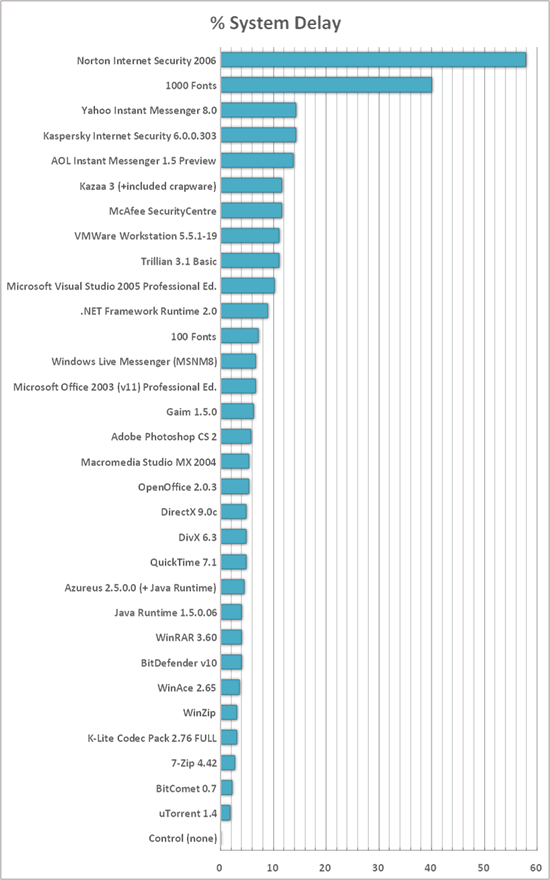
| Software | Mean Boot Time (s) | System Delay (s) | System Delay (%) |
|---|---|---|---|
| Norton Internet Security 2006 | 118.33 | 43.33 | 57.78 |
| 1000 Fonts | 105.00 | 30.00 | 40.00 |
| Kaspersky Internet Security 6.0.0.303 | 85.67 | 10.67 | 14.22 |
| Yahoo Instant Messenger 8.0 | 85.67 | 10.67 | 14.22 |
| AOL Instant Messenger 1.5 Preview | 85.33 | 10.33 | 13.78 |
| McAfee SecurityCentre | 83.67 | 8.67 | 11.56 |
| Kazaa 3 (+included crapware) | 83.67 | 8.67 | 11.56 |
| Trillian 3.1 Basic | 83.33 | 8.33 | 11.11 |
| VMWare Workstation5.5.1-19 | 83.33 | 8.33 | 11.11 |
| Microsoft Visual Studio2005 Pro. | 82.67 | 7.67 | 10.22 |
| .NET Framework Runtime2.0 | 81.67 | 6.67 | 8.89 |
| 100 Fonts | 80.33 | 5.33 | 7.11 |
| Microsoft Office 2003(v11) Pro. | 80.00 | 5.00 | 6.67 |
| Windows Live Messenger(MSNM8) | 80.00 | 5.00 | 6.67 |
| Gaim 1.5.0 | 79.67 | 4.67 | 6.22 |
| Adobe Photoshop CS 2 | 79.33 | 4.33 | 5.78 |
| OpenOffice 2.0.3 | 79.00 | 4.00 | 5.33 |
| Macromedia Studio MX 2004 | 79.00 | 4.00 | 5.33 |
| QuickTime 7.1 | 78.67 | 3.67 | 4.89 |
| DivX 6.3 | 78.67 | 3.67 | 4.89 |
| DirectX 9.0c | 78.67 | 3.67 | 4.89 |
| Azureus 2.5.0.0 (+ Java Runtime) | 78.33 | 3.33 | 4.44 |
| BitDefender v10 | 78.00 | 3.00 | 4.00 |
| WinRAR 3.60 | 78.00 | 3.00 | 4.00 |
| Java Runtime 1.5.0.06 | 78.00 | 3.00 | 4.00 |
| WinAce 2.65 | 77.67 | 2.67 | 3.56 |
| K-Lite Codec Pack 2.76FULL | 77.33 | 2.33 | 3.11 |
| WinZip | 77.33 | 2.33 | 3.11 |
| 7-Zip 4.42 | 77.00 | 2.00 | 2.67 |
| BitComet 0.7 | 76.67 | 1.67 | 2.22 |
| uTorrent 1.4 | 76.33 | 1.33 | 1.78 |
| Control (none) | 75.00 | 0.00 | 0.00 |
Things That Did Bad
The results of the security software were quite shocking. I’ve always known that being most involved with the system, antivirus and firewall programs are going to make things slower, but I was just completely astounded by the Norton result when compared against the other software on show.
Fonts were as, if not more, amazing. I know people always say not to install too many fonts (which is really hard when you have a DVD full of them), but this is the first proof I’ve seen that shows fonts have a massive effect on the windows load time.
One conclusion that we can take from this is software that makes many, many changes to the system when it installs is going to have a larger effect to windows boot timings. Examples of this were shown by the .NET runtime (both standalone and part of Visual Studio) and the fonts which get scooped up by system services. VMWare Workstation installs a lot of system drivers to emulate hardware properly which also goes a long way to slow down a computer. Furthermore, if that software loads at boot, this is going to have an added knock on effect, shown best by the antivirus programs and the chat clients.
Things That Did Well
Surprisingly, the codecs made little effect. Even the full (everything checked) K-Lite Codec Pack only added a few seconds to the boot time. Quicktime was slower as this installs a load-on-boot tray icon.
The compression utilities all did very well considering that all of them add about thirty extension associations and add explorer context menus. I think this shows that they’re both fairly lightweight and you shouldn’t be too concearned over applications which install them.
BitDefender was another suprise. I’ve heard a lot of mixed things about it since I started the testing but it certainly uses the fewest resource on boot. This could mean a couple of things: Either its incredibly efficient or its a very lazy protection scheme that doesnt protect your computer all the time.
Final Words…
In closing, just be careful over what you install. If you need a font for something, you only need to open it in the Windows font browser and it should become available in your application until you close the font browser. Installing and forgetting about fonts is a very easy way to slowly degenerate your boot times. If you can avoid them, don’t install an antivirus program (especially not Norton). That’s not perfect advice for everyone, but if you’ve got an oodle of web-smarts, you should be able to spot what’s bad and what’s ok.
One thing not covered by this test (for sheer time purposes)is what happens when you uninstall the software. It’s well known that applications junk the registry with crap long after they’ve gone so be aware that the only way to get some of that performance back from a bad application may be to do a clean install of Windows.
Another was drivers. Drivers are known to increase the boot time (as VMWare displays) but are completely impossible to demonstrate on a testing system like this. If I did the tests again with a whole PC and different hardware, this would be more a test of hardware than software. If you want to know how drivers perform, read the hardware reviews.