What Really Slows Windows Down
The follow up experiment testing more software with improved benchmarks. If you want to know what applications are slowing down your machine, check out this post.
A week ago, I performed a study demonstrating how certain applications can slow down Windows. If you didn’t catch it, I’ll sum things up now.
I took a clean Virtual PC install of Windows XP Pro (SP2a) and installed Microsoft BootVis on it. For those not in the know, BootVis is a tool that lets you time how long windows takes to start up. It does a lot more, but I wasn’t interested in any of that for the experiment. I’ve had a lot of feedback via email over it: mostly praise and suggestions for the next round-up.
Lots of people complained about me using Virtual PC. The reason I chose it at the time is because I know from experience that VMWare is about 1000times heavier on the host OS. It installs drivers and system services all over the place and is generally unpleasant unless you need to use it all the time.
Most of the suggestions that filtered into my inbox were for other antivirus systems. I’ve added a bevy of different applications and I’ve also re-benched Norton InternetSecurity, considering this did worst of all the applications tested last time. Searching on places that the old article got linked from, I saw that Norton got quite a bad (but not unexpected) deal, so I wanted to make sure that this wasn’t unjust.
The Host System
Some people also commented that it would make more sense if they knew more about the physical setup I’ve been running the tests on. So for them, here’s what my PC is:
- AMD 64 X2 4800+
- 2Gig DDR RAM
- 2x 36Gig WD Raptors in RAID0 (system OS)
- 2x 120Gig Seagate Barracudas in JBOD (one for VM, other as the scratch disk)
- 3x 300Gig Maxtor DM10s in RAID5 (nothing to do with any of this =])
The more astute will have noticed that I’ve got two cores (effectively two processors). For both the experiments I set the affinity of all the host OS programs to one core and set the VM onto the other core. The VM also had 512megs (of 2048) RAM dedicated to it. I also used two HDs for the system. One was a read only base-image of Windows and the other was used as the “scratch” disk – in short where all the changes were made.
There were also a lot of people saying that the figures I was providing did not reflect accurately on what really slows windows down. I think that’s slightly fair although it’s also a fair assumption that if something is bogging down the start up, it’s going to continue its reign of terror all the way through your lovely Windows session.
The New Benchmarks
Alongside the same boot time test with BootVis, I needed to decide on a way of testing how fast the computer was when it was all up and running. I chose the two most effected subsystems of the computer: the processor and the storage.
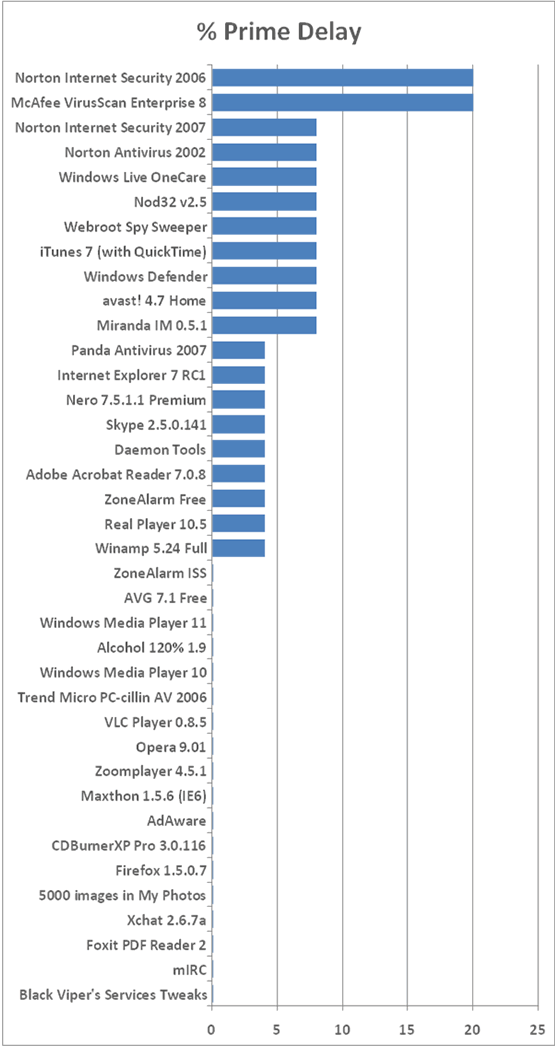
The CPU gets used up when an application is running, therefore I only expected this to be a limiting factor on those applications which either run all the time in the background or modify system settings. The algorithm I ran was one to find all the prime numbers between 100,000 and 200,000. Not mega-maths, just something to give me a good result in a nice range.
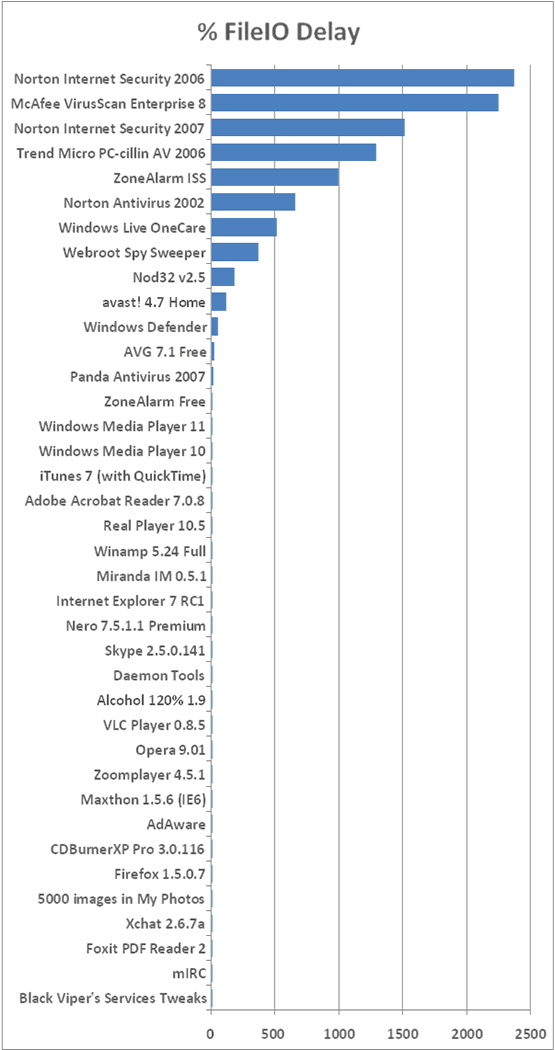
I expected the storage readings to be a lot more varied. These were going to be effected by the applications that monitor what you’re doing on the PC, mainly anti-virus and anti-spyware applications. A “good” (I should say: secure) anti-virus application will check every disk operation to make sure that there is no bad activity. The problem comes where doing this costs you CPU cycles and also a massive amount of disk performance. The algorithm for this test made a new file and wrote a line to it. Then it would close it (allowing any application to be notified of a change), open it back up and write an extra line; repeating that last step 10,000 times. I understand that this is not “normal usage” but the results speak for themselves.
I compiled these algorithms in C++ (so no additional framework was needed). You can also download this source code from here. If you find it, or the rest of this article useful, please make a donation for the upkeep and addition to the site. The code is covered by the Creative Commons copyright agreement that covers the rest of this site. If you need other licensing options, contact me.
Norton Internet Security 2007
I got an email from Symantec’s PR people just before I was about to publish this article. Understandably they were upset about the last article and wanted to help as much as they could. I’ll let you draw your own conclusions over motives etc but they were kind enough to furnish me with a copy of NIS2007 which, at the time of writing, is unavailable in the UK from their online store. They’ve asked me to run the benchmarks
My first impressions of this were that it was a much smother install process than the previous version (which occasionally decided to stall for a time) and it did not require a reboot after installing, something that strikes me as slightly odd if a lowly graphics package reckons it needs a restart post-install. I restarted it all the same.
It’s certainly no less graphical than previous versions but they have attempted a "Web 2.0" style for the interface. Isn’t it strange how these things come around?
The VM did seem a lot faster than it had done on a few tests but I’ll let the next page speak the figures. I included NIS2006 alongside to allow a direct comparison (plus to give it another chance).
I’ve also had the chance to squeeze in more than I would have, had the article gone out when I’d first intended.
The Contenders
I’ve tried to repeat as few tests as possible so that I could put my time into doing new things that people wanted benchmarking… If I’ve still missed something off, contact me and I’ll see about adding it either to this list, or the next one like it. I’ll say now (and probably again later): this took a lot of time.
Anti-virus Suites
I concentrated on these last time as they were the worst offenders, but some missed the chance to have a go and therefore I’m giving these lucky packages a chance to show how slow they can really make your computer crawl.
- Norton InternetSecurity 2007
- Norton InternetSecurity 2006
- ZoneAlarm Internet Security Suite
- Nod32 version2.5
- Microsoft Windows Live OneCare
- avast! 4.7 Home
Anti-virus
The classic systems that ran the world before security became silly. Some have added features like mail-scanning, but nothing fancy like a firewall.
- McAfee VirusScan Enterprise 8
- Norton Antivirus 2002 (OEM)
- AVG 7.1 Free
- Panda Antivirus 2007
- Trend Micro PC-cillin AV 2006
Anti-Spyware & Firewalls
These are standalone applications specifically for one job. Only… Erm… Two can survive. You should note that Ad-Aware does not run all the time like most anti-malware applications (unless you purchase it) and therefore it was only functioning as a post-active system. Prevention is the best policy.
Office
There’s been a lot of emphasis over Foxit PDF Reader over the last couple of days. It’s time to see how they compare here.
Browsers
I didn’t count browsers significantly large enough to affect the system, so they were left out of the last test. I’ve included them in this on demand.
Media
I covered some codecs last time and they generally performed well. This time I’ve covering some of the players that you might use with them.
- iTunes 7 (including QuickTime)
- WinAmp 5.24 Full
- RealPlayer 10.5
- Windows Media Player 10
- Windows Media Player 11
- VLC Player 0.8.5
- ZoomPlayer 4.5.1
Messengers
There were also a lot of messenger utilities in the last roundup but it turns out you can never have enough messengers so here are a few more by popular demand.
CD, DVD & Virtual Drive Applications
Here’s anything to do with burning, cloning, imaging and mounting “removable media”.
- Nero7 Premium Reloaded v.7.5.1.1 (everything they do including SmartStart)
- CDBurnerXP Pro 3.0.116 (including .NET Framework v1.1)
- Alcohol 1.9.5.4327
- Daemon Tools 4.0.3
Other Things
Here are the things that I decided I couldn’t be bothered to add extra things to bulk out a group were unique enough to stay on their own.
- Black Viper’s Services Tweaks
- Adding 5000 images into the My Photos section of My Documents
Results and Conclusions
Few will be shocked by anything here. One of the most surprising things to be gleaned from here is the blatant time and effort Symantec have gone to improve their product from the 2006 version. This won’t help you if you own that version, but it should give you a good idea what to expect from Symantec in the future if you’re determined to stick with their product line.
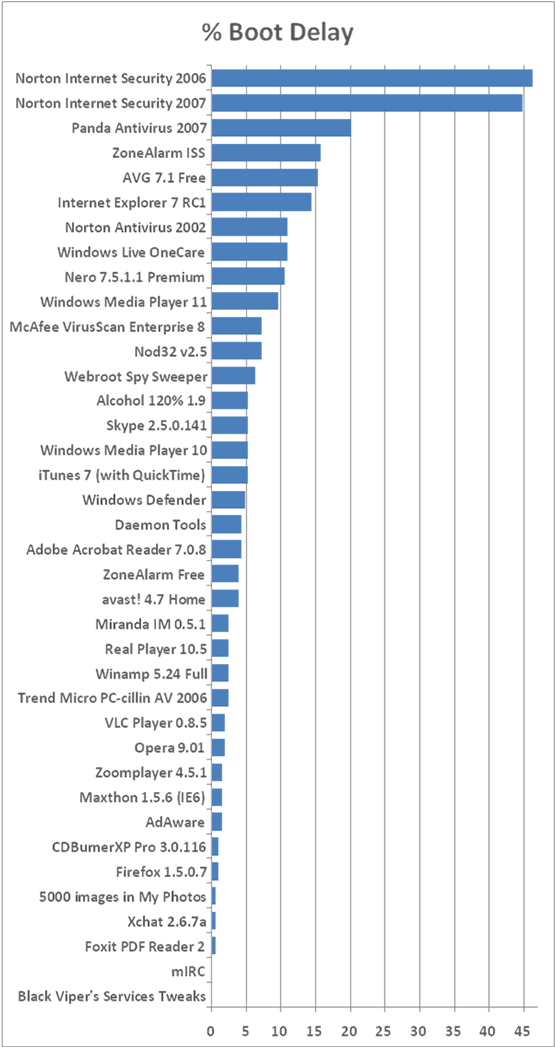
Here’s the table of results for all three sections ranked by their overall performance degradation. The control times where:
- Boot Time: 70 seconds
- Prime: 26 seconds
- FileIO: 25 seconds
| Software | % Boot Delay | % Prime Delay | % FileIO Delay |
|---|---|---|---|
| Norton Internet Security 2006 | 46 | 20 | 2369 |
| McAfee VirusScan Enterprise 8 | 7 | 20 | 2246 |
| Norton Internet Security 2007 | 45 | 8 | 1515 |
| Trend Micro PC-cillin AV 2006 | 2 | 0 | 1288 |
| ZoneAlarm ISS | 16 | 0 | 992 |
| Norton Antivirus 2002 | 11 | 8 | 658 |
| Windows Live OneCare | 11 | 8 | 512 |
| Webroot Spy Sweeper | 6 | 8 | 369 |
| Nod32 v2.5 | 7 | 8 | 177 |
| avast! 4.7 Home | 4 | 8 | 115 |
| Windows Defender | 5 | 8 | 54 |
| Panda Antivirus 2007 | 20 | 4 | 15 |
| AVG 7.1 Free | 15 | 0 | 19 |
| Internet Explorer 7 RC1 | 14 | 4 | 0 |
| Windows Media Player 11 | 10 | 0 | 8 |
| iTunes 7 (with QuickTime) | 5 | 8 | 4 |
| ZoneAlarm Free | 4 | 4 | 8 |
| Nero 7.5.1.1 Premium | 10 | 4 | 0 |
| Windows Media Player 10 | 5 | 0 | 8 |
| Adobe Acrobat Reader 7.0.8 | 4 | 4 | 4 |
| Miranda IM 0.5.1 | 2 | 8 | 0 |
| Winamp 5.24 Full | 2 | 4 | 4 |
| Real Player 10.5 | 2 | 4 | 4 |
| Skype 2.5.0.141 | 5 | 4 | 0 |
| Daemon Tools | 4 | 4 | 0 |
| Alcohol 120% 1.9 | 5 | 0 | 0 |
| Opera 9.01 | 2 | 0 | 0 |
| VLC Player 0.8.5 | 2 | 0 | 0 |
| AdAware | 1 | 0 | 0 |
| Maxthon 1.5.6 (IE6) | 1 | 0 | 0 |
| Zoomplayer 4.5.1 | 1 | 0 | 0 |
| Firefox 1.5.0.7 | 1 | 0 | 0 |
| CDBurnerXP Pro 3.0.116 | 1 | 0 | 0 |
| Foxit PDF Reader 2 | 0 | 0 | 0 |
| Xchat 2.6.7a | 0 | 0 | 0 |
| 5000 images in My Photos | 0 | 0 | 0 |
| mIRC | 0 | 0 | 0 |
| Black Viper's Services Tweaks | -4 | 0 | 0 |
Boot Delay
The boot delays were quite a lot smaller than last time, likely to be attributable to VMWare having a better grasp on its file system than Virtual PC, but the same names were at the top of this test.
Prime Delay
I wasn’t expecting too much of a result from here. The prime delays would have come on systems where there were applications hogging resources.
FileIO Delay
The only applications this was going to affect were the system-monitors; those applications that require 100% attention on the file system, namely the security products.
Conclusions
Well it’s clear to see what sort of application has most effect on Windows. Antivirus programs tether the performance of your computer alongside that of one three years its elder. If you really need an antivirus system, make sure you follow these benchmarks but also make sure you check how good the one you’re looking at really is. Nod32 gets good security reviews and seems to leave the system fairly nippy
The new version of Norton has shocked me a little. Every year since their Norton AntiVirus 2002, they’ve added more and more "bloat". They call them features, and looking at the box, you’d agree. Features have traditionally come at a price though. If you’re scanning more things, it’s going to take it more time. NIS2007 seems to do all the work of 2006 but with significantly less load on the FileIO. I’m not shouting "go out and buy it" because of the massive boot delay and there are still better products.
If you’re looking for the best of the best antivirus products you should look at their detection rates. There’s no point in having something, no matter how expensive, if it cannot keep you protected. Here is an excellent roundup of anti-virus systems.