Running XP's Solitaire in Vista

It might be ugly but it is a lot faster.
By Oli on Monday, 11th June 2007. More information. Comments.

Considering the lower performance of Vista's games for power-players, I'm taking a look at how to grab older versions from an existing XP installation and get them working on Vista.

A while ago I wrote how Vista's version of Solitaire is much slower than XP's in terms of how long it takes you to complete a game. For most people this isn't an issue but for those of us who are speed freaks, playing the XP versions really is a much more enjoyable experience.

Luckily though, it's very possible to play the XP versions of all the games, just by following some basic trial and erroring. You need access to an XP machine or, better yet, a XP virtual machine on your computer and head into it's %windir%\system32 folder.

Grab the executable of choice (in this case sol.exe) and hoike it back over to Vista — just dump it on the desktop for now — and try running it. You should get a Window like this:
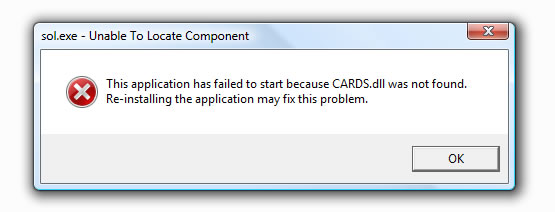
sol error message

So back to XP Land. Head back into the system32 folder and grab the dll. When you get back to Vista make sure you put it in the same directory where you put sol.exe... If you did as I said before, you should be copying to the desktop. Run sol.exe again and:
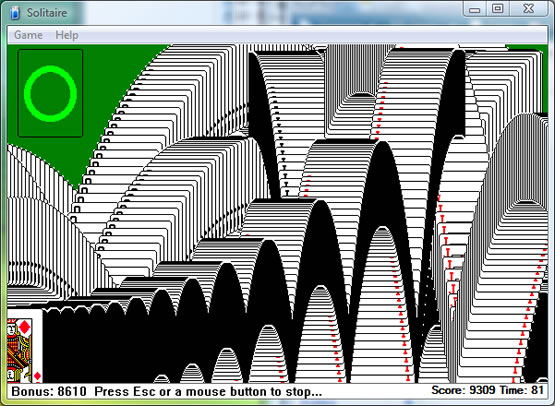
XP's sol running on Vista

You should be able to replicate this for all XP's games as there's nothing that would stop them running on Vista... You just need to make sure that you grab all the relevant files and also that you put them in the right place in Vista. For the mostpart this just mean putting them in the same directory.

Once you've got it running from the desktop, and you're sure you have all the files, dump the directory somewhere in the system and create a shortcut out to the executable. It might be worth making a new Program Files directory for XP games.

If you've got any problems, leave a comment and I'll investigate.

Grav

Written by Oli on Monday, 11 June 2007. Tagged with microsoft, vista, xp, games, technology. Read 27182 times. If you liked it, please give it a digg.

1 to 10 of 33 < 1 2 3 4 >
#1 /* 3 years, 9 months ago */
I tried installing Virtual PC on my Vista and was surprised at how well it worked but it slowed things down a bit especially with PerfectDisk during defragging. So, for that and several other reasons I did a clean install of Vista and it's working so well that I don't want to risk messing it up.

I was hoping you might direct me to the same sol.ex app but from another source.

Thanks, I get your commiseration,

Kerry
#2 /* 3 years, 9 months ago */
Test to see what page comes up once I press the Submit button.

Yesterday I would Press the Next button which would take me to the KittenAuth and then the Submit button and it would take me to a some page but not the thread for me to see my post. I believe I repeated the process three times and then tried email. We'll see what happens now.

Kerry

PS. Once again I had trouble with the KittneAuth pics. I couldn't be sure if some were ground hogs or porcupines. I'm thinking the process is great but some of the questionable pics could be removed. I'm thinking the process might frustrate others like myself.
#3 /* 3 years, 9 months ago */
Testing
#4 /* 3 years, 9 months ago */
Thanks a million Oli. XP Pro's sol.exe is working perfectly on my clean install of Vista Ultimate.

Kerry

Note: When I first upgraded to Vista from XP Pro I successfully copied sol.exe from XP Pro's Windows > system32 folder and it worked. But when I tried the same trick but with a dbl clean install of Vista (on a newly formatted HDD) there were no remnants of XP Pro left so the sol.exe gave me the CARD.dll error. My point is: If someone is just upgrading their XP pro they can also copy sol.exe without having to locate other associated files.
#5 /* 3 years, 9 months ago */
Great article.
#6 /* 3 years, 9 months ago */
Your Classic Solitaire fix for Vista worked great! I searched for sol.exe and cards.dll on the old computer, copied them to my pin drive, set up a new folder in vista and copied the 2 files. Thanks
#7 /* 3 years, 7 months ago */
I too hated the games (solitaire etc) on Vista and searched for a solution. With the aid of your advice and a bit of trial and error I've got it all across and working fine. A tip for the not so technical (like me). Go into "computer" then "windows" but then do search for System32 (not easily visible) Open system 32 folder and you can find mshearts.exe,freecell.exe,sol.exe,spider.exe and cards.dll. Right click on one and use "send" to put it on any removable eg flash drive. repeat with all the others. Create new folder in "Program files" and use drag and drop to move them across. Create a shortcut to the folder.
#8 /* 3 years, 6 months ago */
dear Oli,
I'm sorry for being a bit adamant but I only have a very superficial idea on the workings of softwares. In order for me to understand what you were talking about in the Yahoo Answers you posted to my question, I need a little more detailed instructions. The number 7 reply of "Anthony" is good but I got lost after his third to the last sentence where he mentions about "Create new folder in "Program files"".
I hope that you are a bit patient enough to accommodate me here.
Thanks
JT
#9 /* 3 years, 6 months ago */
dear Oli,
I'm sorry for being a bit adamant but I only have a very superficial idea on the workings of softwares. In order for me to understand what you were talking about in the Yahoo Answers you posted to my question, I need a little more detailed instructions. The number 7 reply of "Anthony" is good but I got lost after his third to the last sentence where he mentions about "Create new folder in "Program files"".
I hope that you are a bit patient enough to accommodate me here.
Thanks
JT
#10 — Author comment /* 3 years, 6 months ago */
JT: I'll make you a quick video tomorrow showing everything that needs to be done.
1 to 10 of 33 < 1 2 3 4 >

Don't just sit there like a lemon! Reply!

Got something to say? Now's the time to share it with the author and everybody else that reads this posting! Lemons need not apply.

edtBOX - xHTML: yes - bbcode:no
Home | Advertise | About | Contact | Legal © Oli Warner 2001—2007 Proud 9rules member